
Search Knowledge Base by Keyword
This KB documentation is using Advanced Search, Links Editor and Elegant Layouts add-ons.
-
Echo Knowledge Base
-
Add-ons
-
Access Manager
Step 2 – Add AI Training Data
0 out Of 5 Stars
| 5 Stars | 0% | |
| 4 Stars | 0% | |
| 3 Stars | 0% | |
| 2 Stars | 0% | |
| 1 Stars | 0% |
Overview
The AI Chat and AI Search are designed to assist your users, but to truly understand your business or organization, it needs to be trained.
This training process involves feeding the AI relevant materials such as:
- KB Articles
- Posts
- Pages
- PDFs
- FAQs
- Notes
Private Articles and Private Posts cannot be used for AI Search and AI Chat. Only public posts, public articles, AI Notes, and PDFs are supported.
By doing so, the AI can learn the nuances of your workflows, terminology, and customer needs, enabling it to provide accurate and tailored responses.
Think of it like onboarding a new team member—without the right information, the AI can only offer generic answers. Once trained with your materials, it becomes a knowledgeable partner, capable of addressing specific inquiries and supporting your team or customers more efficiently.
How to Train AI
Step 1 Add KB Articles as AI Training Data
Add Training Data for AI
Once added, the AI can instantly search through this material in real time to provide more accurate and context-aware answers, similar to having a research assistant who can quickly find relevant information in your knowledge base.
Follow these steps:
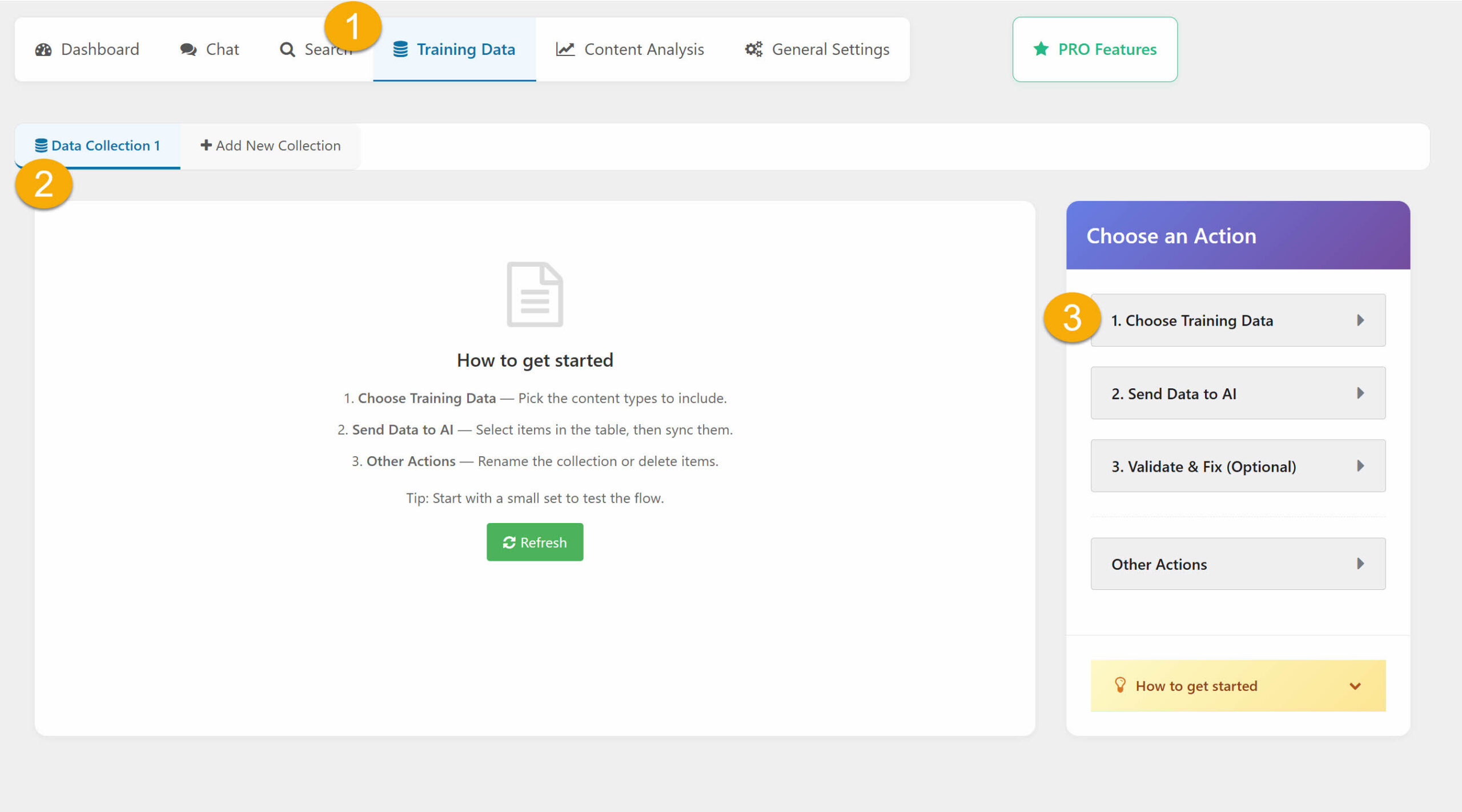
1. Go to the Training Data tab
Click "Add New" to create a new data collection.
2. New 'Data Collection 1' tab is created.
3. Select “Choose Training Data”
On the right side under Choose an Action and click 1. Choose Training Data.
Step 2 Send Data to AI
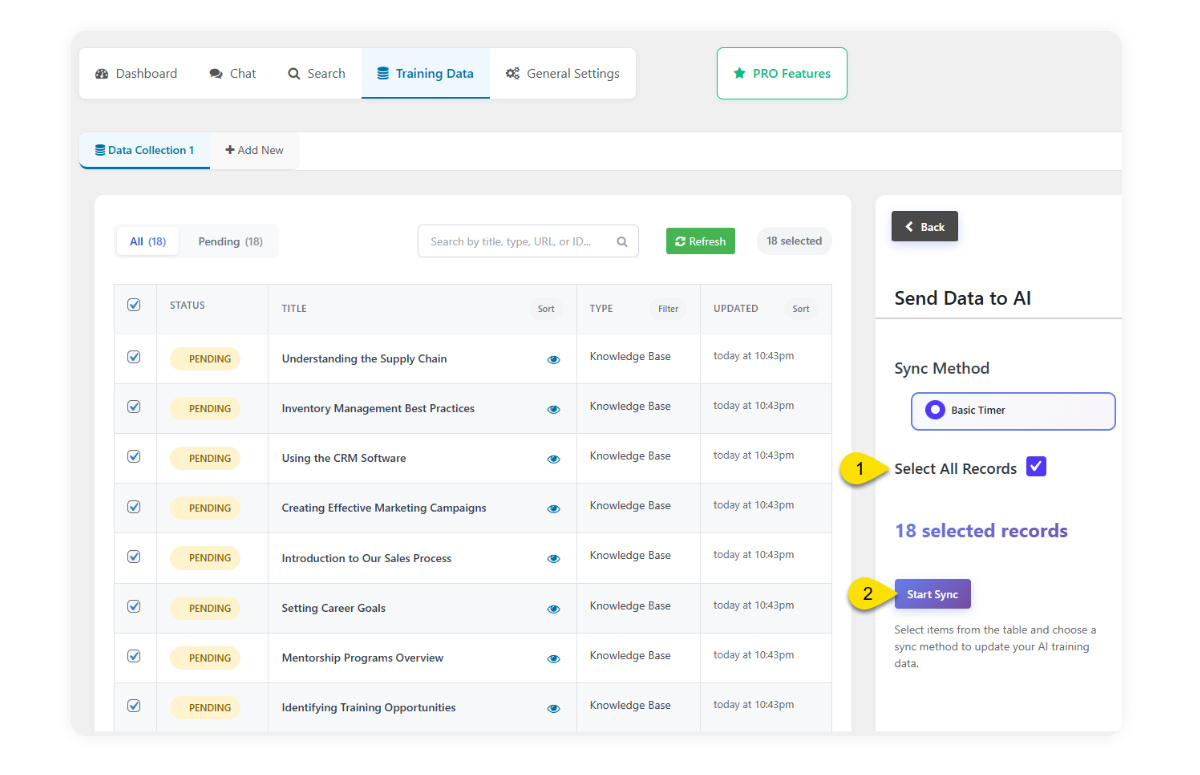
Go to Send Data to AI
Either select all records, or manually select the articles you want to sync from the left column.
Start the sync a progress bar will display the status of the process, and afterward, you’ll see the status of each article.
Step 3 Validate & Fix (Optional)
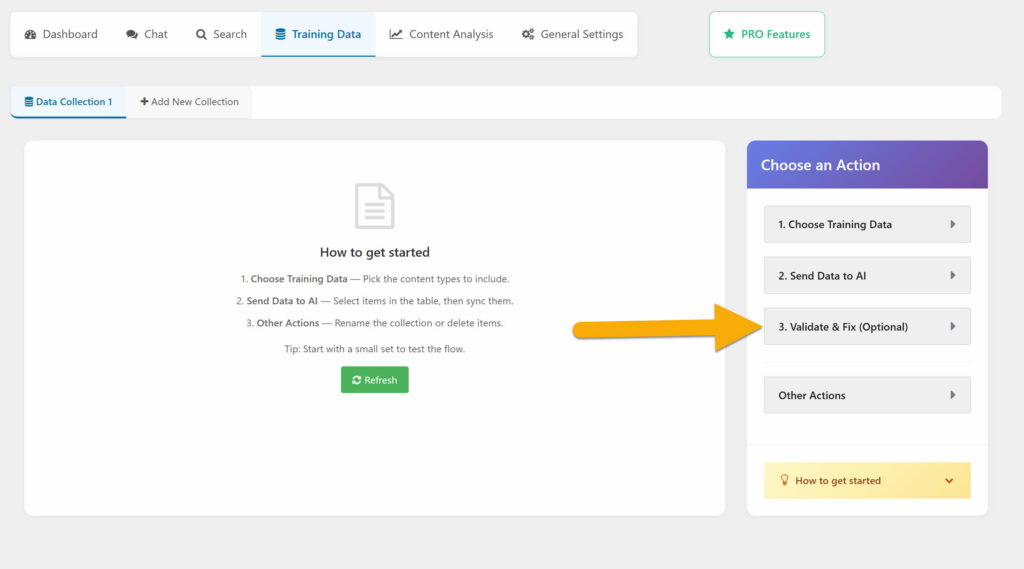
Run an optional validation pass to keep your local training data and the AI Vector Store in sync.
This step checks every Added or Updated item in the collection against the AI store — any item whose file is missing is marked as outdated so it can be re-sent on the next sync.
It also removes orphaned WordPress items, PDFs, and AI Notes that exist only in the AI store. No items are deleted from your local database.
Use this after large syncs, after plugin updates, or whenever you suspect the two sides have drifted apart.
Access Manager does not handle AI Training Data protection. Therefore, Private articles cannot be submitted for AI training.
Here are short tips for adding AI Training Data
Start small
– Begin with 10–20 of your best articles. Test chat/search quality before uploading the full library — it’s faster to iterate and cheaper on tokens.
Quality over quantity
– Only include articles that are complete, accurate, and up to date. Outdated or half-written content trains the AI to give outdated or half-written answers.
Write for answers, not SEO
– Lead with the direct answer, then explain. The AI pulls from the top of articles most heavily — bury the answer and it gets missed.
Use clear titles and headings
– Titles like “How to reset your password” beat “Password Tips.” Descriptive H2/H3 headings help the AI segment content correctly.
One topic per article
– Split long “everything about X” articles into focused pieces. Retrieval works better when each chunk is about a single thing.
Remove noise
– Strip promotional blurbs, “click here” links, repeated boilerplate, and navigation text. The AI treats this as content and it dilutes relevance.
Keep terminology consistent
– Pick one term per concept (“customer” vs “client” vs “user”) and stick with it. Inconsistency makes the AI hedge or return mixed results.
Add synonyms and alternate phrasings
– If users search “refund” but your article says “return policy,” include both terms somewhere in the article.
Re-sync after edits
– Training data is a snapshot. When you update articles, re-sync the collection so the AI sees the new version.