
Search Knowledge Base by Keyword
This KB documentation is using Advanced Search, Links Editor and Elegant Layouts add-ons.
-
Echo Knowledge Base
-
Add-ons
-
Access Manager
AI Technical Details
5 out Of 5 Stars
1 rating
| 5 Stars | 100% | |
| 4 Stars | 0% | |
| 3 Stars | 0% | |
| 2 Stars | 0% | |
| 1 Stars | 0% |
Enhance Your Website with AI Chat and Search for Instant, Accurate Support
Adding AI Chat and AI Search to your website allows your users and customers to receive detailed and accurate answers to their queries with minimal cost and effort on your part. This solution provides an efficient way to improve customer experience, reduce support workload, and ensure 24/7 assistance.
We cut repetitive tickets by 73 % on our own support desk after deploying AI Chat and AI Search—slashing response times and freeing the team for high-value work, all without adding head-count.
Extra Wins
- Real-time insight into top pain points & feature requests
- Auto alerts that flag gaps in your docs so you can fix once, help everyone
- Seamless live-agent hand-over (coming soon) for the few questions a bot shouldn’t handle
- Fast ROI: setup in minutes, benefits show up almost immediately.

The AI Chatbot and AI Search features are included free with Echo Knowledge Base.
However, there are two types of costs to be aware of:
1. AI Provider Costs
The AI Chatbot requires an API key from one of these providers:
- Google Gemini (recomended)- You pay Google directly based on usage
- OpenAI ChatGPT - You pay OpenAI directly based on usage (tokens consumed)
You create an account with the AI provider, add credits, and enter your API key in the plugin settings. Echo Knowledge Base does not charge for AI usage - you pay the provider directly and control your own spending.
Typical costs are very low - most knowledge bases cost less than a few dollars per month depending on chat volume.
Note that both Gemini and OpenAI (which powers ChatGPT) offer a free tier for their APIs, allowing you to try and use their services up to certain limits at no cost.
2. AI Features Pro Add-on (Optional)
The basic AI Chatbot is free, but advanced features require the AI Features Pro add-on:
- Agent handoff (escalate to human support)
- User feedback collection (thumbs up/down)
- Content gaps analysis
- Smart email notifications
- Additional training data sources (pages, public posts, custom post types, PDFs, Notes)
Pricing: https://www.echoknowledgebase.com/ai-features-pricing/#pricing
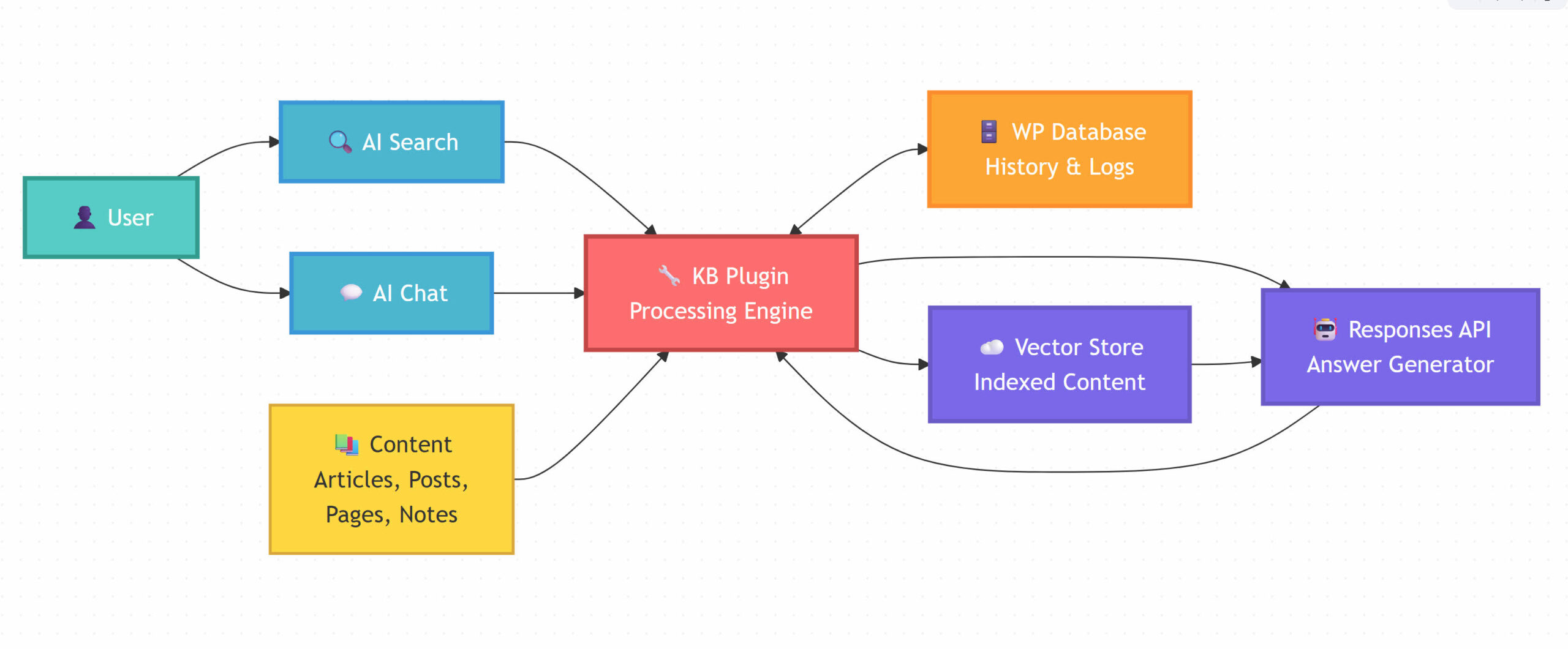
Overview
Each Part Explained:
- Your Visitor/User (Green)
- Anyone visiting your website who needs help or has questions.
- AI Search Box (Blue)
- Where visitors type questions in everyday language – like asking a friend. No need for specific keywords.
- AI Chat Assistant (Blue)
- An interactive chat window for back-and-forth conversations when visitors need more detailed help.
- KB Plugin (Red)
- makes it all work by:
– Connecting your website to AI services
– Processing and storing your content
– Managing conversations and search history
- makes it all work by:
- AI Brain (OpenAI) (Purple)
- The artificial intelligence and storage of AI training data
- Your Knowledge Base Content (Yellow)
- All your articles, pages, and FAQs stored in AI memory, ready to answer questions instantly.
On this page, open our AI Chat in the bottom right corner to discuss these instructions with our AI Chat assistant!
Training Data Sources
Understanding Your Knowledge Sources
Every organization accumulates knowledge in diverse formats – from internal documents (PDFs, XML/CSV data, spreadsheets, code repositories) to support emails/notes and existing help-center articles:
Website Knowledge Base (KB): Existing Public articles, FAQs, and guides on your WordPress site (the user-facing content).
Support and Reference Materials: Support tickets or emails, technical notes, product manuals, data files, code docs, and even relevant third-party links. These contain detailed insights that may not all be published on the website.
By auditing and gathering these sources, you get a comprehensive pool of company knowledge. Private posts and articles cannot be trained on. Only public posts, public articles, AI Notes, and PDFs are supported.
Defining Roles: Website Knowledge Base vs. AI Vector Store
Even after centralizing the content, it’s wise to present it in two complementary forms, each with a clear role:
The Website Knowledge Base: This is a curated set of articles on your site that provides high-level guidance and answers to common questions. Think of it as the user-friendly handbook – it contains overall explanations, step-by-step instructions, and FAQs that customers can easily read and understand. The KB shouldn’t overwhelm users with every detail; instead it offers the essential information and steps to guide users through common tasks or issues.
The AI Vector Store: This is an AI-oriented knowledge repository holding detailed and unstructured information in vector-embeddings for semantic search. It acts as the AI’s brain. All those support notes, detailed technical docs, data tables, and code snippets are ingested into this store (after processing) so that the AI can retrieve fine-grained information when answering user queries. In essence, the vector store is a robust, centralized database of knowledge drawn from all your sources (product docs, tickets, user feedback, etc.) that serves as the foundation for AI analysis and Q&A. Private Articles and Private Posts cannot be used for AI Search and AI Chat. Only public posts, public articles, AI Notes, and PDFs are supported.
By separating these roles, you minimize overlap between what lives on the public KB and what’s hidden in the AI’s index:
The KB articles cover the most common scenarios in a concise way (no need to duplicate lengthy technical text there).
The AI store holds the in-depth information. When users ask the AI for more detail or edge cases not on the site, it can draw from this rich repository to give an answer.
This way, users have two paths: a self-serve KB for quick answers and an AI assistant that can provide deeper insight on demand. They work in tandem: the knowledge base builds confidence with well-structured guidance, and the AI can fill in details or handle unique questions.
Additional Considerations and Best Practices
Maintain and Update the Content Regularly
Feeding your AI outdated or incorrect information can be worse than providing no information. Make sure that whenever a process changes or a new requirement emerges, you update both the public article and its hidden notes.
Treat the knowledge base as a living document. If you fail to do so, users may get frustrated by contradictory or old answers. Schedule periodic reviews of both visible articles and notes to keep them current. An AI is only as good as its knowledge base – if the knowledge base evolves with your business or organization, the AI will continue to give accurate answers.
Structure and Format for AI Consumption
- The way you format your content can impact how well the AI understands and retrieves it. Use clear headings, subheadings, bullet points, and other structured formatting in both articles and notes. This not only helps human readers scan the article, but also aids the AI.
- Semantic structure (like proper HTML headings or markdown) can improve the AI’s ability to find the relevant section of an article when a question is asked. For instance, having a section titled “Requirements” in your hidden notes, or an FAQ list in the support notes, means the AI can pinpoint that section when the query matches those contexts.
- Avoid burying critical info in long paragraphs without structure – breaking them into lists or Q&A format can make retrieval more precise.
5 out Of 5 Stars
1 rating
| 5 Stars | 100% | |
| 4 Stars | 0% | |
| 3 Stars | 0% | |
| 2 Stars | 0% | |
| 1 Stars | 0% |