
Search Knowledge Base by Keyword
This KB documentation is using Advanced Search, Links Editor and Elegant Layouts add-ons.
-
Echo Knowledge Base
-
Add-ons
-
Access Manager
Categories and Articles
0 out Of 5 Stars
| 5 Stars | 0% | |
| 4 Stars | 0% | |
| 3 Stars | 0% | |
| 2 Stars | 0% | |
| 1 Stars | 0% |
Overview
Here’s the breakdown of your website’s Knowledge Base (KB) structure:
- KB Main Page: The landing page for the KB. Users can browse articles by category.
- KB Article Pages: Individual articles, each with a title, navigation sidebar, table of contents, and other relevant information.
- KB Category Archive Pages: Displays content from a specific category (and optionally subcategories) for easy browsing.
- Basic
- Tabs
- Categories Focused
- Classic
- Drill Down
- Grid (Elegant Layouts add-on)
- Sidebar (Elegant Layouts add-on)
You can extensively customize the Categories & Articles module/block, including its colors, features, and labels. See details below.
Examples and Demos
The KB Plugin has a Setup Wizard that previews various designs for each layout. You can also try demos of each layout here.
a) KB Categories & Articles Block
Select KB Layout block and configure it in the block sidebar settings.

b) Categories & Articles module Inside KB Shortcode
To adjust Categories & Articles Module settings integrated into the KB Shortcode, see the options below:

Sidebar Option
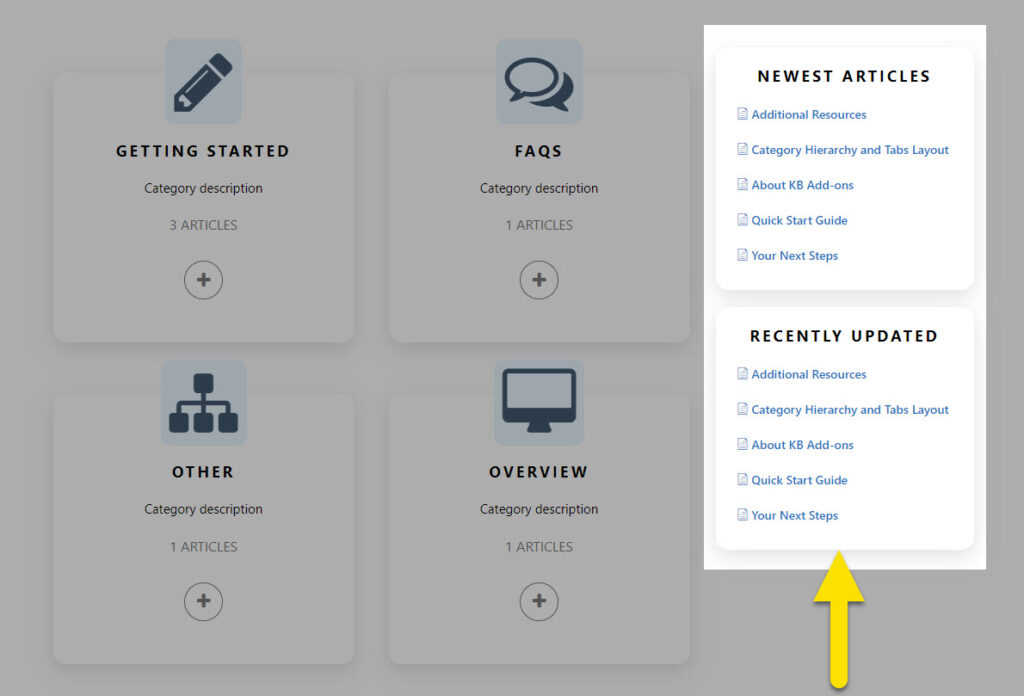
The sidebar feature enables the display of a sidebar next to the categories and articles. At present, this sidebar option provides two lists of articles: “Newest Articles” and “Recently Updated.”
0 out Of 5 Stars
| 5 Stars | 0% | |
| 4 Stars | 0% | |
| 3 Stars | 0% | |
| 2 Stars | 0% | |
| 1 Stars | 0% |