
Search Knowledge Base by Keyword
This KB documentation is using Advanced Search, Links Editor and Elegant Layouts add-ons.
-
Echo Knowledge Base
-
Add-ons
-
Access Manager
Article Page Width
4.7 out Of 5 Stars
3 ratings
| 5 Stars | 33% | |
| 4 Stars | 67% | |
| 3 Stars | 0% | |
| 2 Stars | 0% | |
| 1 Stars | 0% |
Overview
Several Knowledge Base (KB) settings work together to determine how wide your article page appears. It helps to think of them as nested containers, from outermost to innermost:
- Page Template Width (KB Template or Current Theme Template) – the outermost limit. Learn More
- Article Page Width – the main container for the entire article, including the search box and everything inside it.
- Content Width Including Any Sidebars – the width of the center content plus sidebars, inside the article container.
Each inner width is limited by the container around it. For example, the Content Width can never exceed the Article Page Width.
a) Article Page Width
The Article Page Width controls the width of the whole article page - the search box, the article content, and the sidebars are all contained within it.
To update the Article Page Width:
- Open our frontend editor from the top admin bar on the Article page.
- Go to Settings -> Adjust the Article Page Width setting.
Note: If the page is narrower than expected and you have selected the Current Theme Template, your theme may be limiting the page width. Check your theme settings. Learn More
See image blow ( Blue Arrows )
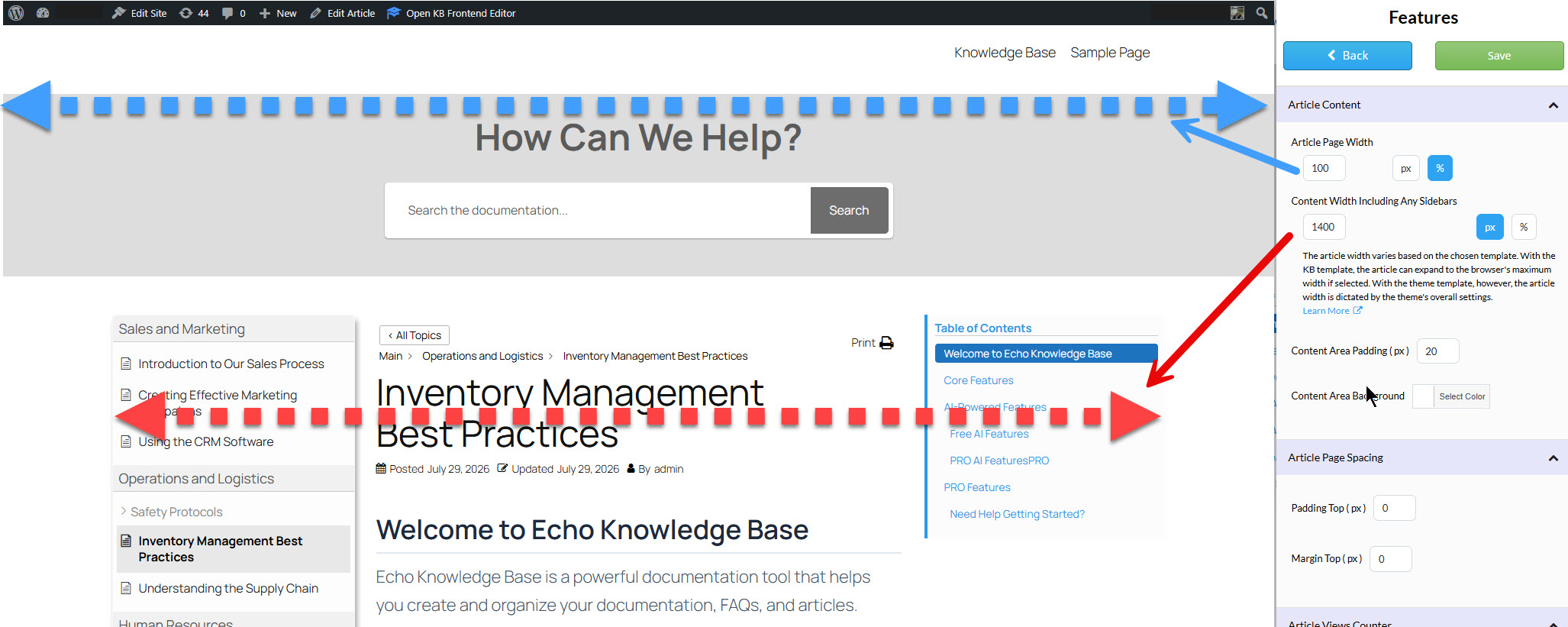
b) Content Width Including Any Sidebars
This setting controls the combined width of the center article content and any sidebars. It fits inside the article container, so it can never exceed the Article Page Width – if you need more room, increase the Article Page Width first. See image above ( Red Arrows )
To update the Content Width:
- Open our frontend editor from the top admin bar on the Article page.
- Go to Settings -> Adjust the Content Width Including Any Sidebars setting.
c) Search Box Width
The search box is always set to 100% of the Article Page Width, so it automatically fills the full width of the article container. To make the search box wider or narrower, adjust the Article Page Width setting described above.
d) Sidebar Width
The following article explains how to adjust the sidebar’s width: Click to Learn More
4.7 out Of 5 Stars
3 ratings
| 5 Stars | 33% | |
| 4 Stars | 67% | |
| 3 Stars | 0% | |
| 2 Stars | 0% | |
| 1 Stars | 0% |